
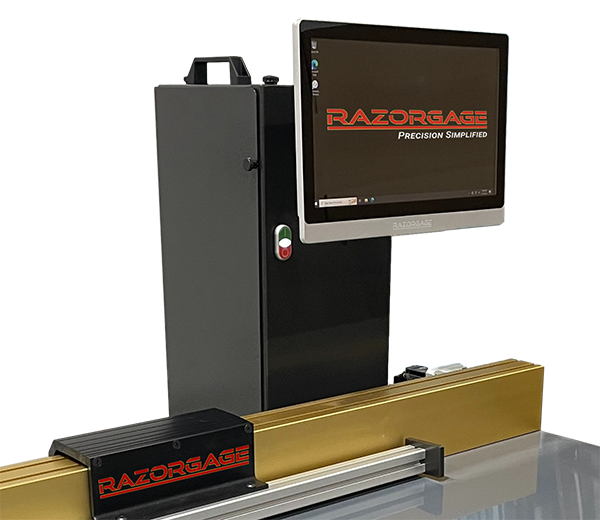
Anyone who has run a chop saw for a full shift knows the problem. You pull the tape, set a stop block, make the cut, and halfway through the pile you start wondering if the last ten pieces match the first ten. A saw measuring system takes that doubt out of the job. It is a motorized stop controlled by a computer, and it moves to the exact length you ask for and holds it there, cut after cut. At RazorGage, we build these systems in Ames, Iowa, for shops that want repeatable parts without a lot of hand measuring. Here is how they work, what to look for, and where they save the most time.
How Does a Saw Measuring System Work?
The idea is simple. A carriage rides on a rail beside your saw. A motor moves it to a set position, you push the material against it, and you make the cut. The operator either types a length or loads a cutlist, and a touch on any line sends the stop to that position. Some setups also work as an automatic pusher, so the machine feeds the material instead of you.
What makes it accurate is the part most people never see. The controller works out position by counting motor rotation, so any slack in the drive shows up as error in the part. That is why the hardware matters as much as the software.
Why Does the Hardware Matter So Much?
Look at how the carriage moves. On the RazorGage ST, the carriage runs on a hardened and ground Hiwin linear rail with two recirculating ball bearing blocks, the same kind of rail used on CNC machining centers. A planetary gearhead with near zero backlash drives it, and the motion controller reacts quickly to jams, so belts do not stretch out over time. The belt carries a five year warranty.
The listed accuracy is plus or minus .004 inch over 12 feet, as long as the system is calibrated with a capable measuring device. That last part is worth remembering. No gauge stays accurate if nobody checks it against a good reference.
What Machines Can You Pair It With?
More than most people expect. The ST can sit beside a chop saw, upcut saw, downcut saw, drill press, or a haunching, notching or punching machine. Stroke lengths go up to 60 feet, so it suits long lineal stock as well as short parts.
The Windows software stores thousands of cutlists and sorts them into groups by material, color or job. You can print labels with barcodes or QR codes, and an optional add-on called AutoList helps you get more parts out of expensive material. If you prefer a simpler screen, the ST-A runs on Android with the same mechanical build underneath.
Where Does the RazorOptimal Fit In?
Some shops want the whole job automated, not just the stop. That is where the RazorOptimal comes in. It pairs the ST positioner with the Cyclone 600 upcut saw to make a programmable optimizing saw system. The operator loads a cutlist, marks defects on the board with a crayon, and the machine does the rest.
How Does It Handle Defects?
The system scans the length of the board and finds the crayon marks. It then fits the remaining parts into the clean sections, so knots and splits end up in the scrap instead of in your finished work. It also clamps the material automatically from the top, left and right. An optional inkjet printer can mark part information straight onto the piece. A 500mm blade comes standard, with a 600mm blade as an option.
Is There a Pocket Hole Version?
Yes. The RazorOptimal can also be built with an 18-inch downcut saw that drills pocket holes and scribes face frame layout lines in the same pass. For cabinet shops, face frame parts come off the machine ready to assemble, which removes a separate drilling step.
How Do You Pick the Right Setup for Your Shop?
Start with what you cut. Short wood parts, long aluminum extrusions and face frames all call for different setups. Then think about volume. If one person cuts all day, an automatic pusher like the APS, which can move a 200 pound load at 10 inches per second, saves real walking and lifting. If you only need a reliable stop on an existing saw, an entry level gauge like the XT may be enough.
Ask about networking too, since the Windows-based software connects to your office computers like any other PC. And ask for a demo on your own material when you can. A video is useful, but watching your own parts come off the saw tells you more.
Final Thoughts
A good saw measuring system pays you back in fewer mistakes, less scrap and more cuts per hour. The mechanical build decides how long it stays accurate, and the software decides how easy it is to run. If you want to go further and automate defect cutting, the RazorOptimal is worth a look. Reach out to our team in Ames, and we will help you match the right system to your shop.
FAQs
What is a saw measuring system used for?
It positions a stop at exact lengths so every cut matches your cutlist. Shops use it to speed up repeat cuts and cut down on measuring errors.
How accurate is the RazorGage ST?
RazorGage lists plus or minus .004 inch over 12 feet when the system is calibrated with a capable measuring device. Real results also depend on your saw, material and setup.
Can it be used with any saw?
It works with chop saws, upcut and downcut saws, drill presses, and haunching, notching and punching machines. If your machine is unusual, check with the team before ordering.
What does the RazorOptimal do differently?
The RazorOptimal scans crayon-marked defects and fits your parts around them, then cuts automatically. The pocket hole version also drills pocket holes and scribes face frame lines.
Where is RazorGage built?
The systems are made in Ames, Iowa, in the United States. You can contact the sales team directly for pricing and demos.
Contact Us:
Address: 57006 241st Street Ames, IA 50010
Phone: 515.232.3188
Email: sales@RazorGage.com